
Workflow playbook
Software engineers6 steps6 toolsDeveloper AI Coding Workflow
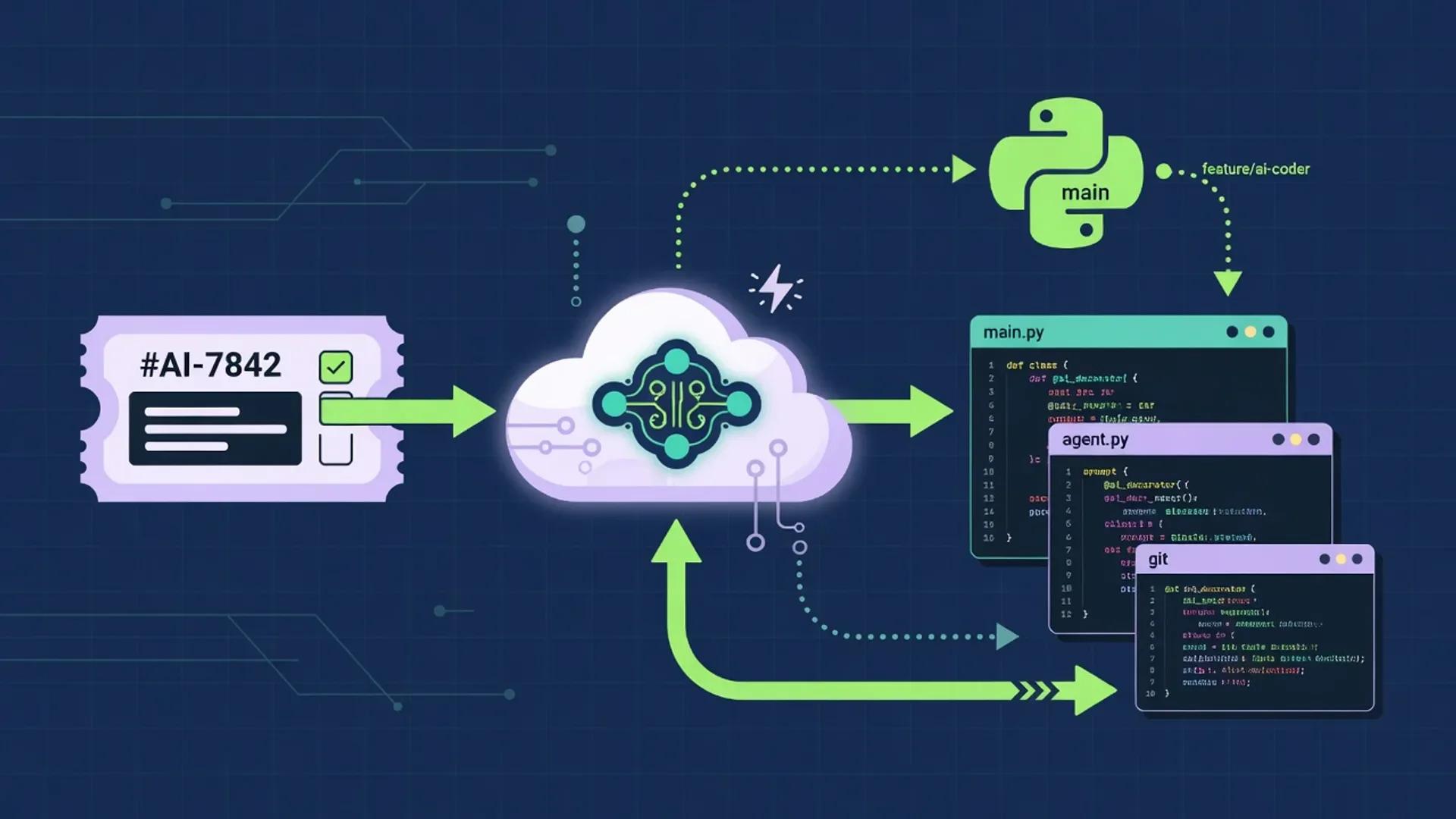
A multi-step AI coding workflow that keeps humans in charge of framing, architecture, security, and merge decisions while agents handle research, boilerplate, test scaffolding, and review. Drawn from primary docs and standards published between July 1 and August 2, 2026.
Best for · Software engineers and technical founders
Playbook
Steps
Step 1
Frame the problem and constraints
Capture the user problem, success criteria, non-goals, stack constraints, and security or compliance boundaries in a short technical brief. The OpenAI Codex prompting guide asks writers to put the result first, then context, output format, and boundaries, and recommends a dedicated plan or goal for multi-step coding work (accessed 2026-08-02). Do not generate production code before the problem and constraints are clear.
Step 2
Research APIs, patterns, and prior art
Investigate libraries, official docs, known pitfalls, and comparable implementations with a citation-oriented research assistant, then validate anything security- or correctness-critical against primary documentation. Save links and decisions back into the brief. Anthropic's common workflows guide explicitly recommends reading files, running commands, and quoting real examples instead of relying on training memory (accessed 2026-08-02).
Step 3
Design the approach before coding
Outline modules, interfaces, data flow, and test strategy. Ask a general agent to pressure-test edge cases and failure modes, then pick the simplest design that meets the constraints. The VS Code agents overview describes plan mode as a built-in step for researching and proposing changes without editing files, so the design can be reviewed before it lands (accessed 2026-08-02). Keep architecture decisions human-owned.
Step 4
Implement in the IDE with AI pair programming
Write code with an AI-native editor or inline completion, committing in small steps and reviewing every suggestion. Never paste secrets into prompts. OpenAI Codex's AGENTS.md doc explains the precedence order, merge rules, and fallback filenames for layered repository context, and the GitHub Copilot code review doc notes that model and prompt tuning happen in their own control plane (accessed 2026-08-02). The JetBrains AI Assistant help, GitHub Copilot prompt engineering guide, and Cursor security doc all repeat the same advice: keep agent scope to the workspace, prefer tools that understand local repo context for multi-file edits, and use a reviewed diff as the merge unit (accessed 2026-08-02).
Step 5
Review, test, and harden
Run tests, request a structured AI code review, and fix issues before merge. Treat AI review as a second pair of eyes, not a replacement for CI, linting, or human review on sensitive paths. GitHub Copilot code review pulls full project context through GitHub Actions and posts inline findings; Claude Code review runs as a background subagent and posts severity-ranked comments; OpenAI Codex ships a custom Code Review rules file in AGENTS.md (all accessed 2026-08-02). The Anthropic engineering team measured 98% recovery of required custom findings with rule-guided reviews versus 58.3% in the baseline (OpenAI developer blog, July 2026).
Step 6
Document decisions and hand off
Update READMEs, ADRs, and runbooks with what changed, why, and how to verify. Keep durable docs in a team workspace so the next engineer does not depend on chat history. The OpenAI Codex AGENTS.md doc and the GitHub Copilot custom-instructions table both recommend a shared AGENTS.md or .github/copilot-instructions.md that all agents read, with path-scoped files for subdirectories (accessed 2026-08-02).


Notes
Details
Why a developer AI coding workflow matters
The 2026 generation of AI coding tools is no longer a single autocomplete; it is a fleet of agents that can read a repository, run tests, open a pull request, and post a review. I keep a workflow because speed without accountability produces more diffs, not better software. A developer AI coding workflow is a short list of human-owned steps that frame, research, design, implement, review, and document code while delegating typing, research, and routine review to AI. Treating it as a workflow, not a single prompt, is the difference between an assistant that ships useful work and one that ships fluent-looking risks.
Operating principles I keep on one page
These are the rules I read on Monday before opening any generation tool. They are short on purpose.
- Brief before code. Clear constraints beat clever prompts. The OpenAI Codex prompting guide recommends starting with the result, then context, output format, and boundaries, rather than asking the model to invent them (OpenAI Codex Prompting, accessed 2026-08-02).
- Sources before stack choices. Prefer primary documentation over model memory. Anthropic’s common-workflows guide tells users to read files, run commands, and quote real examples instead of trusting recalled knowledge (Anthropic Common Workflows, accessed 2026-08-02).
- Plan before multi-file edits. A short design pass is cheaper than a bad refactor. The GitHub Copilot code review doc frames review as a separate agentic step that depends on a clean plan (GitHub Copilot Code Review, accessed 2026-08-02).
- Humans before merge. Automate scaffolding, not accountability. OpenAI’s Lockdown Mode page is the cleanest public writeup of an agentic safety posture: limit outbound network access by default, prefer cached over live data, and require explicit confirmation for consequential actions (OpenAI Lockdown Mode, accessed 2026-08-02).
- Tests before confidence. Green checks beat “looks right.” Anthropic’s best-practices page makes the same point: a check Claude can run — tests, a build exit code, a screenshot — is the difference between a session you watch and one you walk away from (Anthropic Best Practices, accessed 2026-08-02).
How the named tools map to the workflow
The tools below are the ones I cite in this article. They are the same product slugs already used in the current article frontmatter.
| Tool | Where it fits in the workflow | Primary doc I cite |
|---|---|---|
| ChatGPT | Brief framing, plan stress-tests, prompt drafting | ChatGPT release notes (accessed 2026-08-02) |
| Claude (Code) | Long-context research, plan mode, code review, docs | Claude Code docs (accessed 2026-08-02) |
| Perplexity | Citation-oriented web research | Perplexity FAQ (accessed 2026-08-02) |
| GitHub Copilot | Inline completion, code review, custom instructions | GitHub Copilot docs (accessed 2026-08-02) |
| Cursor | Agent security defaults and auto-review | Cursor Agent Security (accessed 2026-08-02) |
| JetBrains AI Assistant | IDE-integrated agent mode and completion | JetBrains AI Assistant docs (accessed 2026-08-02) |
| Notion AI | Team workspace and durable handoff docs | Notion AI product page (accessed 2026-08-02) |
The column on the right is a citation pointer, not a benchmark. Treat the tool as a slot in the workflow and replace it if your team has a different default.
Suggested team roles for an AI coding workflow
A workflow survives contact with reality only when someone owns each step. These are the roles I keep in a small team; merge them in a one-person build.
- Tech lead or founder: owns problem framing, security boundaries, and the merge decision. Reviews the design before any code lands.
- Implementer: drives the IDE session, runs the test suite, and writes the commit message. Reads every diff before staging.
- Reviewer: challenges edge cases, security, and maintainability. Reads the AI reviewer’s findings and either accepts or rejects them.
- Doc owner: keeps the brief, ADRs, and runbooks current. Handoff docs outlast the chat.
I separate “generate” sessions from “approve” sessions even on a one-person day, and I wait at least 30 seconds before approving AI suggestions for any change that touches auth, payments, or data exfiltration paths. The OpenAI Codex prompting guide makes the same point: a wide “do whatever you think is best” prompt is the easiest prompt to misdirect (OpenAI Codex Prompting, accessed 2026-08-02).
Comparison: lean stack vs full agentic stack
There is no single right stack. The table below compares two reasonable shapes for the six steps in this workflow.
| Workflow step | Lean stack (1–2 tools) | Full agentic stack | Best for |
|---|---|---|---|
| Frame the brief | Notion AI | Notion AI + ChatGPT | Solo builders; teams with a clear intake |
| Research | Perplexity | Perplexity + Claude with web search | Content-heavy weeks; product or policy pivots |
| Design the approach | Claude plan mode | ChatGPT + Claude plan mode | Multi-file refactors; new service scaffolding |
| Implement | Cursor | Cursor + GitHub Copilot + JetBrains AI | IDE-first teams; polyglot codebases |
| Review | GitHub Copilot code review | GitHub Copilot + Claude code review + Cursor agent security | Sensitive code paths; regulated industries |
| Document and hand off | Notion AI | Notion AI + Claude | Long-lived team workspaces; multi-engineer teams |
Both shapes respect the same rule: humans still approve anything that makes a factual claim, commits customer money, or commits customer time. The Anthropic blog post on Codex Code Review reports a 98% recovery of required custom findings with rule-guided reviews versus 58.3% in the baseline (OpenAI Dev Blog: Custom Code Review rules for Codex, published July 2026).
Step 1 — Frame the problem and constraints
AI coding assistant: a class of LLM-backed tool that reads repository context, suggests code, and may act on files, terminals, or external systems. The OpenAI Codex prompt-engineering page defines the term implicitly when it asks you to “describe the result, context, output, and boundaries” before you generate (OpenAI Codex Prompting, accessed 2026-08-02).
A short brief should answer four questions: what the user gets, what they explicitly do not get, which constraints I will not negotiate on, and which approval gate I will use. I write this in a workspace page, not a chat, so it survives the session.
What to capture before opening a generation tool:
- Result: one sentence that names the user-visible change.
- Context: file paths, naming, and the data the assistant will see.
- Output: language, framework, file name, and test expectations.
- Boundaries: what the assistant must not touch (auth, billing, migrations, secrets) and what to do when it hits them.
Example brief template (labeled example, not first-hand testing):
# Brief: add idempotency keys to /api/checkout

## Result
Clients can safely retry /api/checkout without producing duplicate
orders, by sending an Idempotency-Key header that the server stores
for 24 hours.

## Context
- /api/checkout is in services/checkout/src/routes/checkout.ts.
- The orders table already has a unique constraint on
  (user_id, idempotency_key) when the key is non-null.
- Redis is available at the existing client.

## Output
- TypeScript handler changes in checkout.ts.
- New migration that adds idempotency_key column.
- Vitest cases for: missing key, duplicate key, expired key, race.
- README note in services/checkout/README.md.

## Boundaries
- Do not change the response shape of existing successful responses.
- Do not read or log raw card numbers.
- Do not modify the /api/refund handler.
- If you need to touch the payments service, stop and ask.
The Codex prompting guide frames the same shape as Goal, Context, Output, and Boundaries (OpenAI Codex Prompting, accessed 2026-08-02).
Step 2 — Research APIs, patterns, and prior art
Repository context: the set of files, index, and configuration the agent ingests before responding. The GitHub Copilot docs distinguish “context Copilot provides” from “context you provide” with
@workspace,#file, and#symbolreferences (GitHub Copilot: Prompt engineering, accessed 2026-08-02).
I run a citation-oriented research pass for libraries, breaking changes, and known pitfalls, then I open the primary docs before I trust a recommendation. The Anthropic common-workflows guide gives a useful check: read files and run commands in the actual project, and ask Claude to quote the lines it found (Anthropic Common Workflows, accessed 2026-08-02).
Example research sequence (labeled example):
- List 10 questions a real buyer asks before trusting the change.
- Cluster them by job, objection, and urgency.
- Search each cluster with customer wording, neutral wording, and the most formal API name.
- Open every cited URL. Record the publisher, the publication or update date, the relevant passage, and what the page does not say.
- Drop claims that depend on a page without a date or a page you cannot reach.
Step 3 — Design the approach before coding
Plan mode: an IDE state in which the agent reads files and proposes a plan but does not edit source until the human approves. The VS Code agents overview describes a built-in “Plan” agent that produces a step-by-step implementation plan for review and refinement before any file change (VS Code Agents Overview, accessed 2026-08-02).
A short design pass is the cheapest insurance against a multi-file rewrite. The Anthropic best-practices page makes the rule explicit: “Letting Claude jump straight to coding can produce code that solves the wrong problem. Use plan mode to separate exploration from execution” (Anthropic Best Practices, accessed 2026-08-02).
I ask one model to design and a second model to attack the design. The Codex prompting guide recommends asking the planning model for clarifying questions before it starts, and the Claude Code planning doc recommends pressing Ctrl+G to edit the plan in your editor before the agent proceeds (OpenAI Codex Prompting, accessed 2026-08-02; VS Code Planning, accessed 2026-08-02).
Example design prompt (labeled example):
Design the change to /api/checkout. Return:
- A list of files you would change, with a one-line reason for each.
- The shape of the new IdempotencyRecord table or Redis key.
- The exact TTL and eviction rule.
- The tests you would add, named after the behavior, not the code.
- The first thing that could go wrong.
Do not edit any files. If the brief is ambiguous, ask before designing.
Step 4 — Implement in the IDE with AI pair programming
Inline suggestion: a single line or block of code the editor offers at the cursor. The OpenAI Codex prompting page and the GitHub Copilot prompt-engineering page both warn that “the model cannot read your mind” and that vague prompts produce vague code (OpenAI Codex Prompting, accessed 2026-08-02; GitHub Copilot Prompt Engineering, accessed 2026-08-02).
Code referencing: a feature that compares suggested code to public repositories and surfaces a match so the user can decide whether to keep or replace it. The GitHub Copilot docs note that matches to public code are uncommon in typical suggestions (GitHub Copilot Code Referencing, accessed 2026-08-02).
I keep commits small, review every suggestion, and never paste secrets into prompts. The OpenAI Codex AGENTS.md doc is the cleanest public description of layered repository context: a ~/.codex/AGENTS.md for global defaults, a project-root AGENTS.md for repo norms, and nested overrides for subdirectories, with project_doc_max_bytes (32 KiB by default) bounding the combined size (OpenAI Codex AGENTS.md, accessed 2026-08-02). The GitHub Copilot custom-instructions table lays out the same pattern for .github/copilot-instructions.md, *.instructions.md, AGENTS.md, and skills, with the rule that path-scoped rules only load when matched files are touched (GitHub Copilot Code Review — Custom instructions, AGENTS.md, and skills, accessed 2026-08-02).
The Cursor agent-security page echoes the same advice: agents can edit workspace files without approval by default, configuration files require approval, and “always use version control so you can revert changes” (Cursor Agent Security, accessed 2026-08-02).
Step 5 — Review, test, and harden
Code review (AI): an agentic step that reads the diff and surrounding code, then posts severity-ranked comments to a pull request. The GitHub Copilot code review doc describes a multi-agent review that uses GitHub Actions for full-project context and supports a Medium effort level for security-sensitive code (GitHub Copilot Code Review, accessed 2026-08-02). The Claude Code code review page adds a Low and Medium effort setting and posts findings as inline comments and as a check run summary (Claude Code Code Review, accessed 2026-08-02). The OpenAI developer blog reports a 98% recovery of required custom findings with rule-guided reviews versus 58.3% in the baseline (OpenAI Dev Blog: Custom Code Review rules for Codex, published July 2026).
I treat AI review as a second pair of eyes, not a replacement for CI, linting, or a human review on security-sensitive code. The OpenAI Codex code review doc shows how to put the rules in an AGENTS.md ## Code Review Rules section so they survive across reviewers (OpenAI Codex Code Review, accessed 2026-08-02). I use the GitHub Copilot custom-instructions table to scope rules to the right paths and the OpenAI Codex code review docs to encode the “safe path” alongside the rule.
Example review checklist (labeled example):
- Tests added for the new behavior, named after behavior not code.
- Linting and type checks green on the touched files.
- No new lint suppressions or
@ts-ignoreintroduced. - No secrets in the diff (
.env, tokens, keys, certificates). - Error messages do not include stack traces, internal class names, or raw inputs.
- Authentication, authorization, and rate-limit paths reviewed by a human.
- Migration is backward compatible and reversible.
The Anthropic best-practices page warns that a reviewer prompted to find gaps will usually report some, so I tell the reviewer to flag only gaps that affect correctness and treat the rest as optional (Anthropic Best Practices, accessed 2026-08-02).
Step 6 — Document decisions and hand off
AGENTS.md (or equivalent): a plain-text file at the repository root that AI agents read at the start of every session. The OpenAI Codex AGENTS.md doc documents the discovery order, fallback filenames, and a 32 KiB size cap on the combined prompt (OpenAI Codex AGENTS.md, accessed 2026-08-02). The Claude Code memory page explains the equivalent
CLAUDE.mddiscovery rules and how to import an existingAGENTS.md(Claude Code Memory, accessed 2026-08-02).
I update the brief, the ADR, and the runbook in the same commit as the code change. The Codex prompting guide recommends telling the assistant how the result will be used so it can match the right level of detail (OpenAI Codex Prompting, accessed 2026-08-02). For developer docs, that means stating the audience and the next action the reader should be able to take.
Example handoff block (labeled example):
## What changed
- /api/checkout now honors Idempotency-Key.
- New migration 0042_add_idempotency_key.sql.

## Why
Stripe-style retries were producing duplicate orders when a
client retried after a 502.

## How to verify
- Run: pnpm --filter @app/checkout test:idempotency
- Manual: curl -X POST /api/checkout -H 'Idempotency-Key: abc'
  twice, expect a single row in orders.

## Rollback
- The migration is additive (nullable column) and safe to leave.
- Set IDEMPOTENCY_TTL_MS=0 in checkout.env to disable the feature
  without redeploying.
Practical prompts and checklists
These are starting points, not rules. Drop them into a workspace page and adjust to match your stack.
Example: briefing prompt for step 1
Act as a research planner, not a copywriter. From the supplied
customer notes, extract:
1. Recurring jobs and anxieties,
2. The intent stage the customer is at,
3. Exact customer language to keep,
4. Unanswered questions to investigate,
5. Claims that need evidence.
Return a table. Do not add facts or recommendations.
Example: planning prompt for step 3
Design the change to {feature}. Return a numbered list of files
with a one-line reason for each, the data shape, the tests, and
the first thing that could go wrong. Do not edit any files. If the
brief is ambiguous, ask before designing.
Example: code review prompt for step 5
Review this PR against /plan.md. Check that every requirement is
implemented, the listed edge cases have tests, and nothing outside
the task's scope changed. Report gaps, not style preferences. Cite
file:line for every gap.
Example: pre-merge checklist (labeled example)
- Brief, plan, diff, and tests reviewed in that order
- No secrets in the diff, the chat, or the agent logs
- CI green on the touched files
- AI review findings either accepted, rejected with reason, or re-classified as non-blocking
- AGENTS.md and any
.github/copilot-instructions.mdupdated - Handoff block in the merge commit message
How I keep prompts and context out of the wrong hands
Prompt injection: a technique where an attacker inserts instructions into content the agent reads so the model does something the user did not ask for. The OWASP LLM01:2025 entry lists direct and indirect prompt injection, multimodal vectors, and code-injection variants as the top risks for LLM applications (OWASP LLM01:2025 Prompt Injection, accessed 2026-08-02). The OpenAI Lockdown Mode page describes the layered defense the company ships in ChatGPT: model training to recognize and ignore prompt injection, automated monitoring, sandboxing, red-teaming, and user controls (OpenAI Lockdown Mode, accessed 2026-08-02).
Indirect prompt injection: a sub-class of prompt injection where the malicious instructions live in third-party content the agent fetches, like a README, a JIRA ticket, or a web page. The OWASP LLM01:2025 entry calls out scenario #2 in which an LLM summarizing a webpage picks up hidden instructions and inserts an image linking to an exfiltration URL (OWASP LLM01:2025 Prompt Injection, accessed 2026-08-02).
I keep secrets, customer data, and unreleased business numbers out of every agent prompt and out of every agent’s indexed context. The Cursor agent-security page says agent changes save immediately to disk and configuration files require approval (Cursor Agent Security, accessed 2026-08-02). The Claude Code security page lists a separate category of network and command-injection defenses and the same pattern of limiting agent reach (Claude Code Security, accessed 2026-08-02).
Five rules I keep on a sticky note:
- No secrets in prompts. If a tool needs a token, it reads it from a secret store at call time, not from a pasted value.
- No customer data in prompts for untrusted inputs. If the agent reads a ticket, file, or page, the contents are untrusted by definition.
- No unreleased business numbers in prompts. Treat any non-public metric the same way you treat a credential.
- One network posture at a time. The OpenAI Codex agent-internet-access doc explains that Codex cloud turns off agent internet access during the agent phase and turns it back on only for setup, and that turning it on increases the risk of prompt injection, exfiltration, and pulling in content with license restrictions (OpenAI Codex Agent internet access, accessed 2026-08-02).
- Audit the tools the agent calls, not just the agent. MCP servers extend what the agent can do, and a malicious or compromised server can become the source of a prompt-injection payload. The OpenAI Lockdown Mode page treats MCP and tool selection as part of the threat model (OpenAI Lockdown Mode, accessed 2026-08-02).
The CISA Five Eyes statement on AI and cyber risk adds a leadership framing: the same document that says AI “lowers barriers for malicious actors and increases the speed and complexity of attacks” also says secure-by-design and secure-by-default “must become standard practice — not an aspiration” (CISA Five Eyes Cyber Security Agencies Statement, released June 22, 2026).
How I evaluate whether the workflow is working
Evals (evaluations): structured tests for AI systems that produce a comparable score across runs. The OpenAI evaluation best-practices page frames evals as a continuous discipline: build a dataset that reflects production traffic, pick a metric that maps to the user outcome, log every run, and re-evaluate on every change (OpenAI Evaluation Best Practices, accessed 2026-08-02).
I treat the workflow as I would treat any production system: I measure it. The OpenAI page warns that “LLMs are better at discriminating between options,” so I prefer pairwise and pass-or-fail metrics over open-ended scoring (OpenAI Evaluation Best Practices, accessed 2026-08-02).
A simple eval I run on every change to the workflow:
- Pick three representative tasks from the last sprint that the team found hard.
- Run the task through the workflow twice, once with AI and once without, and compare the time and the number of rollbacks.
- Track a small set of “did the AI make a claim we had to verify” events per week. The OpenAI safety best-practices page notes that humans should be aware of model limitations and have access to the information needed to verify outputs (OpenAI Safety Best Practices, accessed 2026-08-02).
- Track “did a human approve a claim the AI made” as a separate event. If the number drops, the human is rubber-stamping.
- Track “did the AI read a file the human would not have read.” If the number is high, the context window is leaking across trust boundaries.
The CISA Five Eyes statement frames the same idea from the security side: the time between vulnerability discovery and exploitation is shrinking, and “delays in patching increase risk” (CISA Five Eyes Cyber Security Agencies Statement, released June 22, 2026). An eval on a stale workflow is a vulnerability.
What I never automate
Some boundaries exist because the alternative is bad, not because it is inconvenient. These are the lines I draw for myself and the team.
- No auto-merge on AI approval. Human review of the diff is mandatory. The OpenAI Codex agent-approvals-security doc explains that the agent “asks for approval before running commands that can modify your system” by default (OpenAI Codex Agent approvals & security, accessed 2026-08-02).
- No auto-send of customer-facing messages. Drafts only. A human reads the message before it leaves the building.
- No auto-apply of code review fixes. I read every suggested fix and the diff it produces, and I run the test suite myself before merge.
- No secrets in agent logs. The OpenAI safety best-practices page recommends that the company revoke compromised API keys promptly through the Security settings (OpenAI Safety Best Practices, accessed 2026-08-02). The same principle applies at the team level: rotate any key that touched an agent, even if the agent claims it redacted.
- No agent edits to license files without a human. The SPDX License List documents common open-source licenses, and the SPDX short-form identifiers in a
// SPDX-License-Identifier:line are the easiest way to keep a record of what the codebase ships (SPDX Handling License Info, accessed 2026-08-02). I want a human to read the diff before an AI rewrites a license header.
What an honest “this is what I tested” looks like
I do not claim to have benchmarked the named tools against each other, and I am not going to invent a number. The OpenAI Codex Codex prompt engineering guide and the Anthropic best-practices page are explicit that outputs can be inaccurate and that the user should independently verify any consequential claim (OpenAI Codex Prompting, accessed 2026-08-02; Anthropic Best Practices, accessed 2026-08-02).
What I can claim, with sources:
- The Anthropic engineering team’s rule-guided review eval, reported in the OpenAI developer blog in July 2026, found 98% recovery of required custom findings versus 58.3% in the baseline (OpenAI Dev Blog: Custom Code Review rules for Codex, published July 2026).
- The OWASP GenAI Security Project and the CISA Five Eyes statement, both published or updated in 2026, identify prompt injection and supply-chain risk as the top concerns for agentic coding tools (OWASP GenAI Security Project; CISA Five Eyes Statement, released June 22, 2026).
- The OpenAI Codex prompting guide, the OpenAI Codex AGENTS.md doc, the GitHub Copilot code review doc, and the Claude Code memory page all describe a layered, file-based approach to repository context, with a recommended maximum size, a path-glob override pattern, and a human-approval gate before edits land (OpenAI Codex AGENTS.md, accessed 2026-08-02; GitHub Copilot Code Review, accessed 2026-08-02; Claude Code Memory, accessed 2026-08-02; OpenAI Codex Prompting, accessed 2026-08-02).
What I cannot claim, because I do not have it: a side-by-side benchmark of GitHub Copilot, Cursor, ChatGPT, Claude, Perplexity, JetBrains AI, and Notion AI on the same task. If a vendor’s site makes that claim, treat it as marketing until you can reproduce it in your own environment.
Frequently asked questions
How do AI coding assistants use repository context?
They read the files you point them at, the files the editor opened for them, and any indexed semantic or grep search. OpenAI Codex’s AGENTS.md doc explains that the assistant builds an instruction chain from a global ~/.codex/AGENTS.md, a project-root AGENTS.md, and nested overrides, with a 32 KiB size cap on the combined prompt (OpenAI Codex AGENTS.md, accessed 2026-08-02). Claude Code uses an equivalent CLAUDE.md chain, and GitHub Copilot uses .github/copilot-instructions.md and path-scoped *.instructions.md files (Claude Code Memory, accessed 2026-08-02; GitHub Copilot Code Review, accessed 2026-08-02).
How do AI code review tools review pull requests?
GitHub Copilot code review uses agentic capabilities to gather full project context through GitHub Actions and posts findings as inline comments, with a Medium effort level for security-sensitive code (GitHub Copilot Code Review, accessed 2026-08-02). Claude Code Code Review runs as a background subagent, posts findings as inline comments and a check run summary, and reports an average completion time of 20 minutes (Claude Code Code Review, accessed 2026-08-02). OpenAI Codex lets you put review rules in an AGENTS.md ## Code Review Rules section so the rules travel with the repo (OpenAI Codex Code Review, accessed 2026-08-02).
How should teams prevent prompt injection in AI coding agents?
Apply the OWASP guidance: constrain model behavior, define and validate output formats, implement input and output filtering, enforce least privilege, require human approval for high-risk actions, segregate and identify external content, and conduct adversarial testing (OWASP LLM01:2025 Prompt Injection, accessed 2026-08-02). The OpenAI Lockdown Mode page describes the layered defenses OpenAI ships in ChatGPT, including model training, monitoring, and sandboxing (OpenAI Lockdown Mode, accessed 2026-08-02). The Claude Code security page lists prompt-injection defenses built into Claude Code, including URL two-step approval, edit review, agent sandboxing, and Workspace Trust (Claude Code Security, accessed 2026-08-02).
How should secrets be handled when using AI coding agents?
Treat any value that reaches the agent as exposed. The OpenAI Codex agent-approvals-security doc explains that secret values configured for cloud environments are available only during the setup phase and are removed before the agent phase starts, and the Codex CLI masks secrets in agent session logs (OpenAI Codex Agent approvals & security, accessed 2026-08-02). The OpenAI safety best-practices page tells developers to revoke compromised API keys promptly (OpenAI Safety Best Practices, accessed 2026-08-02). The Claude Code security page recommends using the macOS Keychain on macOS and protected file permissions elsewhere for credentials (Claude Code Security, accessed 2026-08-02).
What permissions do AI coding agents need?
The minimum the task requires, and nothing more. OpenAI Codex’s permission model distinguishes “Ask for approval,” “Approve for me,” and “Full access,” and recommends starting with “Ask for approval” (OpenAI Codex Permissions, accessed 2026-08-02). Claude Code’s permission modes are similar, with auto mode using a classifier to handle low-risk actions and bypass-permissions mode available only in isolated environments (Claude Code Permission Modes, accessed 2026-08-02). The Cursor agent-security page adds that the auto-review classifier and MCP allowlists are best-effort guardrails rather than a hard boundary (Cursor Agent Security, accessed 2026-08-02).
How do teams evaluate AI generated code?
Treat evals as a continuous discipline. The OpenAI evaluation best-practices page recommends building a dataset that reflects production traffic, picking a metric that maps to the user outcome, logging every run, and re-evaluating on every change (OpenAI Evaluation Best Practices, accessed 2026-08-02). The OpenAI safety best-practices page adds that humans should be aware of model limitations and have access to the information needed to verify outputs (OpenAI Safety Best Practices, accessed 2026-08-02).
What is AGENTS.md and how does it work?
AGENTS.md is a plain-text file that AI coding assistants read at the start of every session. The OpenAI Codex AGENTS.md doc documents the discovery order, merge rules, and a 32 KiB size cap on the combined prompt (OpenAI Codex AGENTS.md, accessed 2026-08-02). Claude Code reads an equivalent CLAUDE.md and can import an existing AGENTS.md so a single file serves multiple tools (Claude Code Memory, accessed 2026-08-02). GitHub Copilot reads .github/copilot-instructions.md and path-scoped *.instructions.md files for the same purpose (GitHub Copilot Code Review, accessed 2026-08-02).
Do AI coding agents need a sandbox?
Yes, for any non-trivial work. OpenAI Codex’s sandbox page explains that the default workspace-write sandbox mode blocks network access unless enabled, and that the Linux and Windows implementations use OS-level enforcement (OpenAI Codex Sandbox, accessed 2026-08-02). Claude Code’s sandbox page describes a similar OS-enforced isolation for Bash commands and notes that auto-allow mode trusts the sandbox boundary rather than relying on per-action approval (Claude Code Sandbox, accessed 2026-08-02).
What is the SSDF profile for generative AI?
NIST SP 800-218A is a community profile of the Secure Software Development Framework that adds practices, tasks, and references specific to AI model development, supporting Executive Order 14110 (NIST SP 800-218A, published July 2024, current as of August 2026). The base SSDF, NIST SP 800-218 Version 1.1, was published in February 2022 (NIST SP 800-218, accessed 2026-08-02). The page notes that NIST has finalized SP 800-218A and the SSDF project page describes its purpose (NIST SSDF, accessed 2026-08-02). The OWASP GenAI Security Project publishes a Top 10 for LLM Applications updated through 2025 that lines up with the SSDF community profile (OWASP GenAI Security Project, accessed 2026-08-02).
Stack
Tools used in this workflow

GitHub Copilot
Editorially ResearchedGitHub’s AI pair programmer for code completion, chat, and agent-style assistance across the editor, terminal, and GitHub itself.
Stands out · The mainstream AI pair programmer with wide IDE coverage and a multi-agent desktop app, CLI, and SDK that all share one runtime.


Cursor
Editorially ResearchedAI coding agent and editor built for ambitious software, with codebase-aware generation and parallel agents.
Stands out · AI-native editor with parallel agents, cloud agents, and first-party Composer and Grok models.

ChatGPT
Editorially ResearchedOpenAI's general-purpose AI assistant for writing, analysis, coding help, and everyday knowledge work.
Stands out · A mainstream, general-purpose AI assistant with the broadest multimodal feature surface and one of the largest everyday user bases for conversational AI.


Claude
Editorially ResearchedAnthropic's AI assistant focused on careful writing, long-context work, and the strongest agentic coding stack as of July 2026.
Stands out · A general-purpose assistant and agent platform optimized for careful writing, 1M-token long-context work, and the strongest agentic coding surface in 2026 — anchored by Opus 5, Sonnet 5, Fable 5, Claude Code, and Claude Cowork.


Perplexity
Editorially ResearchedAI-powered answer engine that pairs search with cited synthesis for faster research.
Stands out · An answer engine built around citations, then extended to an AI browser and a multi-model Computer that runs work for you.

Notion AI
Editorially ResearchedAI writing, knowledge agents, and meeting notes built into the Notion workspace teams already use.
Stands out · Notion AI is the only AI built directly into the workspace where teams already store docs, wikis, projects, and meeting notes — so it works on your real context, not in a separate chat window.
Related
Related reading
HubSpot AI vs ChatGPT
Pick HubSpot AI when the work is contacts, deals, tickets, and campaigns inside HubSpot. Pick ChatGPT when the work is open-ended drafting, research, multi-tool reasoning, or anything not tied to a CRM object.

Notion AI vs Claude
Choose Notion AI when your team's knowledge, projects, and meetings already live in Notion and you want an agent that can take action inside that workspace. Choose Claude when you want the best standalone writing, reasoning, and long-document analysis regardless of which wiki you use.

GitHub Copilot vs Cursor
Choose GitHub Copilot when you want AI inside every major IDE, GitHub-native admin, and a coding agent that turns issues into pull requests. Choose Cursor when you want the densest AI-native editing experience, a custom frontier coding model, and fleets of cloud agents.

ChatGPT vs Perplexity
Choose ChatGPT for broad multimodal drafting, domain assistants, and a billion-user ecosystem. Choose Perplexity when source-visible research, citation-first answers, or agentic computer use on local files is the daily bottleneck.
development tools
Browse the development category

productivity tools
Browse the productivity category
Keep building
Explore more playbooks and tools
Browse more workflows, or shortlists built around the same stack.